PUBG Mobile sensitivity: a player’s calculator and a way to test the results
Start with a value you know, compare scopes and weapons, then adjust one setting at a time in training.
On this page
Start with an aiming setup you knowCompare recoil between two weaponsTurn estimates into your own settings in trainingHow can a familiar sensitivity become a starting point for another scope or weapon? In October 2026, player simenatsu shared a PUBG Mobile sensitivity and recoil calculator that accepts touch or gyroscope values and estimates alternatives. Its creator says the results need testing in Training Ground. This is a community tool, not an official preset; this article concerns global PUBG Mobile, and current 4.6 menus and options should be checked in-game.
simenatsu: player-created PUBG Mobile calculator and discussion
Start with an aiming setup you know
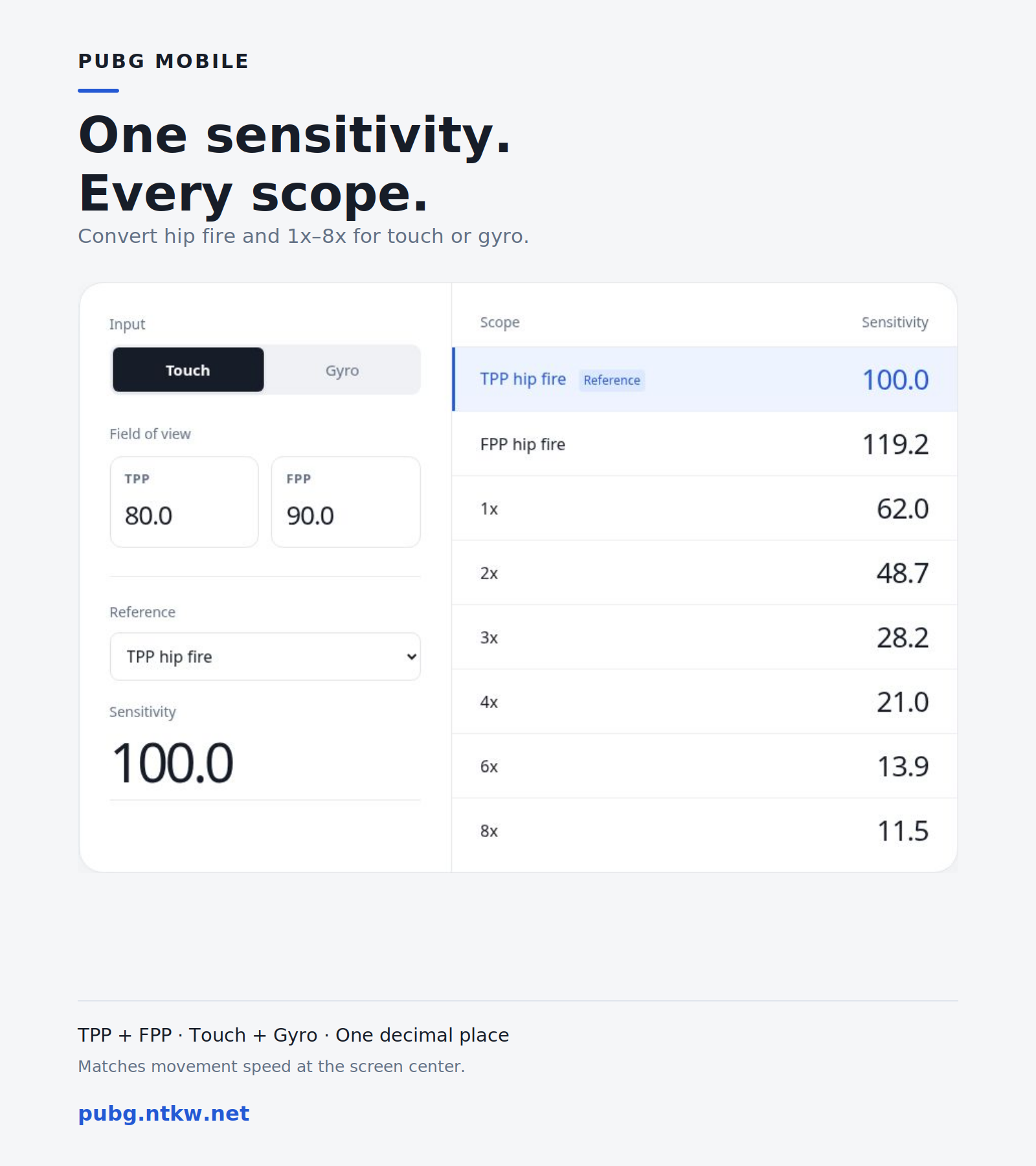
On the tool’s Sensitivity page, select Touch or Gyro, enter the TPP and FPP fields of view you use, then select a familiar hip-fire or scope setting as the reference and enter its sensitivity. The table estimates hip-fire and 1x–8x values. The tool says it aims to match movement at the screen centre; 6x and 8x use their maximum magnification.
For example, its example uses Touch, TPP FOV 80, FPP 90 and TPP hip-fire sensitivity 100; the displayed 1x value is 62.0 and 3x is 28.2. These numbers illustrate the inputs and outputs, not a recommended setup or identical feel on every device. Record your old settings and try one familiar scope before changing the whole table.
Calculator and creator’s guide
Compare recoil between two weapons
On the Recoil page, choose a familiar reference weapon and a comparison, such as M416 and AUG. Enter each weapon’s attachments, firing condition, frame rate and the reference sensitivity. The tool says to use ADS sensitivity for touch and ADS Gyro sensitivity for gyroscope input.
It presents separate candidates for vertical and horizontal recoil: these are alternatives to prioritise, not two settings applied simultaneously. Its guide says it estimates the main recoil and excludes camera shake and recovery, so it cannot make two recoil paths identical. Older official game notes document weapon-specific sensitivity and ADS gyroscope adjustments; check the current interface for menu names and options.
Turn estimates into your own settings in training
Player A1louu describes testing weapons and scopes in Training Ground, practising recoil control and tracking while changing only one setting at a time. Keep the same weapon, attachments and target distance for repeated bursts or sprays; if the result is inconsistent, compare against your saved value before making gradual changes. Another player, Stifflerzxc, notes that a large training target differs from an opponent showing only their head, so check the result in actual matches too.
A1louu: testing sensitivity in Training Ground
Player discussion: how to spray properly
No player’s numbers guarantee “zero recoil”: device, grip, scope and individual habits all affect the choice. Updates may adjust weapons, and a third-party estimate or page may change; use the current game interface and your own practice as the final check.
PUBG MOBILE official historical 1.5 patch notes
Level Infinite: PUBG MOBILE version 4.6