Wuthering Waves explains Steam reinstall steps for Version 3.8
Kuro has detailed the move to its Official Launcher on Steam, including when pre-download support begins.
If you play Wuthering Waves through Steam, the Version 3.8 update will change how the game is installed. In a November 5 Steam notice, Kuro confirmed the switch to its Official Launcher during update maintenance and explained what to do with the old client.
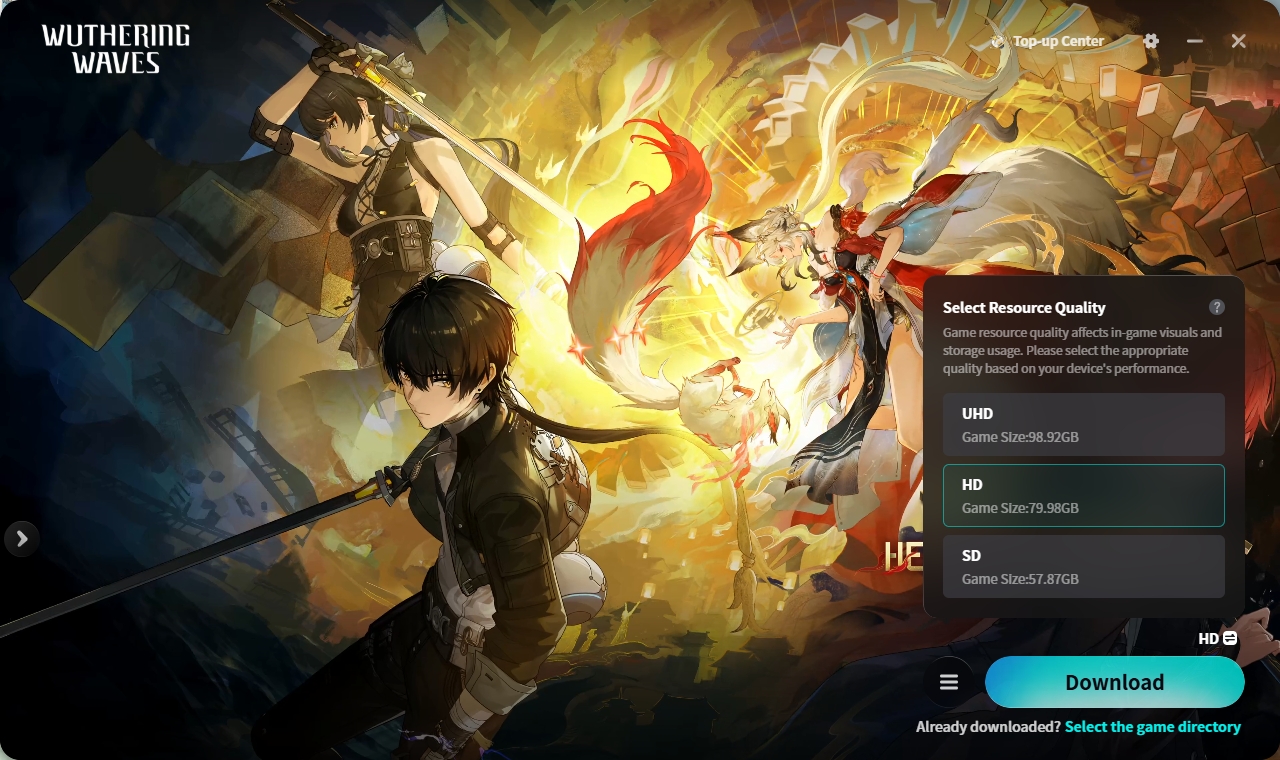
Kuro recommends completely uninstalling the old game package on Steam first. Once Version 3.8 maintenance begins, download and install the new Official Launcher through Steam, then choose the resource tier that suits your device and available storage. The notice does not give a date or time for that maintenance.
The reinstall affects the local game client files. Kuro says account data and in-game progress will not be affected. If login, payment or missing-map-asset problems occur afterwards, it recommends checking whether the old package was completely removed; players can also contact the team through in-game Feedback.
The new launcher will support UHD, HD and SD resource tiers. There is a separate timing detail for pre-download: Steam support is planned, but Kuro says it starts when Version 4.0 pre-download begins, not as soon as 3.8 goes live. The pictured tier selector is from an earlier PC test; the final Steam interface remains to be seen.