

Description
Honor of Kings Token Top-Up Guide
Select the appropriate token package for your Honor of Kings account, verify your UID, and then complete the payment. You can view the order processing progress in the Yoveya order details.
About Honor of Kings
Honor of Kings is a multiplayer online battle arena game centered around 5-vs-5 team battles. Players choose different heroes, work together with their teammates to advance, and strive for victory. Game content, events, and purchasable items are subject to what is actually displayed in the game.
Token and Product Specifications
Tokens can be used to purchase skins and other designated in-game items at the in-game store. The number of tokens included in each package is subject to the sales specifications listed on this page; the specific purchasable items and usage rules are governed by the in-game store.
Scope of Application and Required Information
This item will be processed based on the selected token specifications and game UID. Before placing your order, please verify that your Honor of Kings game version, platform, and server region are within the supported range listed on this page, and confirm your UID in-game. The purchasable quantity for each specification is subject to what is displayed on the checkout page; if you are unsure whether your account is eligible, please contact customer support first.
View UID in-game
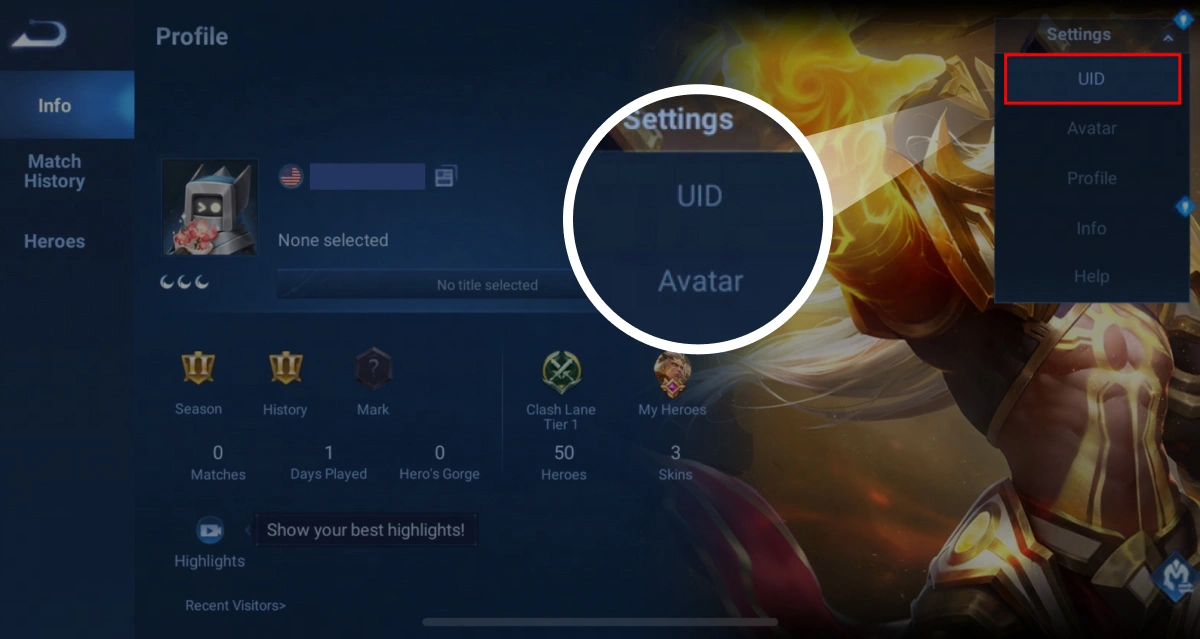
Open your profile in the game, expand Settings, and select UID. The actual interface may vary depending on the game version.
Copy game UID
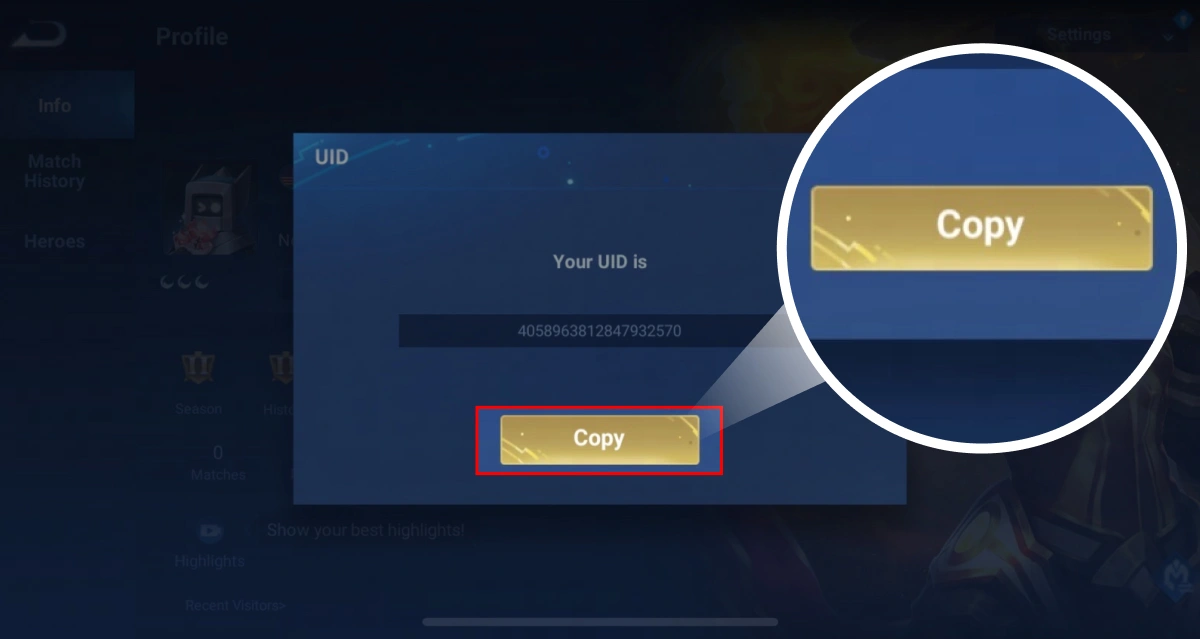
In the UID pop-up window, click Copy, then paste it during checkout and verify each character. Please enter your own UID; do not use the sample number shown in the image.
Detailed top-up steps
1. On this page, select the Token specifications and verify the quantity and price.
2. Follow the prompts on the checkout page to enter your Honor of Kings UID, and verify each digit of your account information.
3. Select a payment method and complete the payment; once payment is confirmed, the order will be processed according to the fulfillment method specified in your selected plan.
4. Track the order status in Yoveya’s order details; after the order is completed, return to the game to verify your Token balance.
Arrival Verification and Exception Handling
After payment confirmation, please refer to the status in your Yoveya order details to check the processing progress. If the order shows as completed but your in-game token balance hasn’t updated yet, please re-enter the game and check again. If the payment has still not been credited, please keep your order number, the UID you provided, and relevant screenshots, and contact customer support through the order page. Processing time may vary depending on payment verification and fulfillment status.
Safety Instructions
Please enter the account information required for this specification only on Yoveya’s official checkout page. Do not provide your game password, verification codes, or payment details via chat or through unfamiliar links. Before making payment, double-check the UID, server region, and token specifications to avoid accidental top-ups. Please do not make duplicate payments for the same order. If you need to cancel or request a refund, please first check the order status and contact customer service; processing will be subject to our product policies and applicable agreements.
- Purchase limits
- The quantity purchased per SKU is subject to the configured range, and the actual purchasable quantity shall be determined by the server-side result at checkout.
- Delivery information
- After payment confirmation, the order will be processed according to the selected fulfillment method, and the progress will be tracked via the order timeline.
- Refund information
- Eligibility for refunds and the refund processing method are subject to the order status, product policies, and applicable agreements.
- Service guarantee
- Prices, inventory levels, payment status, and fulfillment status are all subject to the records maintained on the server.