Choose service modeChoose based on the product and account
2
Choose a product tierPrice is confirmed at checkout
QuantityEach order allows 1–9999 units
3
Enter top-up informationReview carefully before submitting
Price 0.79
Description
Tide Recharge Description
Select the desired moon phase, pass or gift package and complete the payment, then follow the safe link in the order to complete the recharge.
About Wuthering Waves
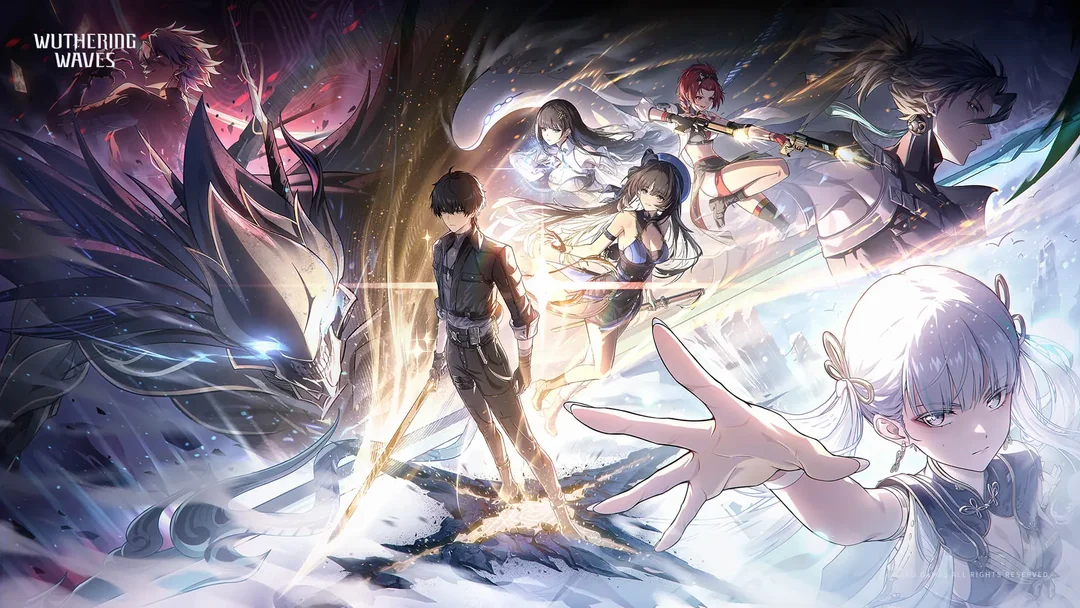
Chime is a story-rich open-world action RPG with a high degree of freedom. The game’s story centers on a wanderer who, as he searches for his lost memories and true identity, encounters a vibrant group of resonators. They explore the unknown future together. As an action game, Naraka: Bladepoint offers a wide variety of combat mechanics, allowing players to utilize techniques such as extreme dodges, dodge counters, Echo skills, and a unique QTE system. In addition, the game features rich exploration content, and there’s no stamina limit while running.
How to top up Wuthering Waves in-game currency on Yoveya
Recharging your Wuthering Waves account with points takes only a moment. Please follow these simple steps to complete your purchase: 1. Visit the Yoveya website, select your preferred language and currency, and log in to your account. 2. On the homepage, go to the game top-up page and find Wuthering Waves. 3. Select the Wuthering Waves gift pack and the desired top-up amount, then click “Top Up Now.” 4. Select a suitable payment method and click “Pay Now” to complete your order. 5. Please enter your game account information to ensure that your top-up is credited successfully. Yoveya processes orders directly using your player ID; you do not need to provide your game password or any third-party account credentials.
How to find your Wuthering Waves player ID
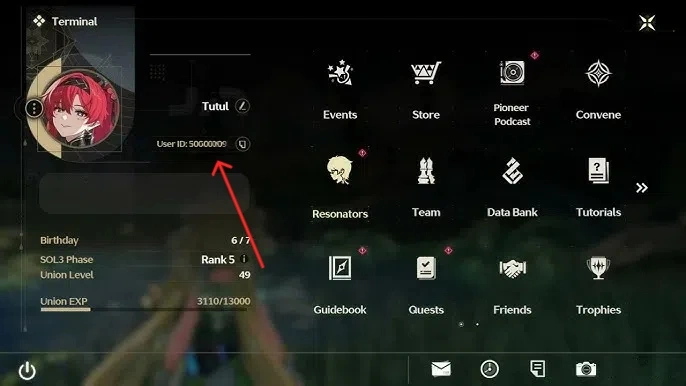
1. Your player ID is a unique numeric identifier linked to your Wuthering Waves profile. This number must be used when completing a top-up on Yoveya. 2. Please follow these steps within the game client to find your ID: 3. Launch Wuthering Waves on your mobile device (iOS or Android). 4. Click the player avatar in the upper-left corner of the main interface to open the profile page. 5. Stay on the “Basic Information” tab. 6. To find your all-numeric player ID, look at the upper-right corner of your profile card. 7. Click the small copy icon next to the ID to copy the number directly to your device’s clipboard. 8. Before placing your order, paste the copied ID into Yoveya’s player ID input field.
Please be sure to enter your player ID as a string of digits only, not your in-game character name. Character nicknames may contain special characters or spaces, which can interfere with automatic V‑Coin top-ups.
Why choose to top up Wuthering Waves on Yoveya?
Yoveya is a global, professional, and secure gaming trading platform that offers services such as game top-ups, account trading, and item trading. Yoveya’s Wuthering Waves top-up service offers faster delivery, higher security, and more competitive prices compared to other platforms!
In addition to Wuthering Waves top-ups, we also support many popular games, such as PUBG MOBILE, Brawl Stars, Arena of Valor, Frostborn, and Taurius World. You can purchase the props you need here at discounted prices and participate in the platform’s occasional promotional events. More importantly, we offer 24/7 online customer support and accept multiple payment methods.
Purchase limits
The quantity purchased per SKU is subject to the configured range; the actual purchasable quantity shall be determined by the server-side result at checkout.
Delivery information
After payment confirmation, the order will be processed according to the selected fulfillment method, and the progress will be tracked via the order timeline.
Refund information
Eligibility for and the processing method of refunds are subject to the order status, product policies, and applicable agreements.
Service guarantee
Prices, inventory levels, payment status, and fulfillment status are all subject to the records maintained on the server.
Wuthering Waves-Tide -60 Moon Phase -60 LuniteUSD 0.84SKU ww-60-lunite · Self-service top-upEach order allows 1–9999 units
Wuthering Waves-Melody of the Tide -60 Lunite Phases -- 60 LuniteUSD 0.79SKU ww-60-lunite-COPY-01a060d78a6a75b39f28687daf1a6163 · Manual top-upEach order allows 1–9999 units
Wuthering Waves-Melody of the Tide -60 Lunite Phases -- 60 LuniteUSD 0.89SKU ww-60-lunite-COPY-01a0bcd7b5d673628de95cefeb6951a0 · UID top-upEach order allows 1–1 units
Wuthering Waves-Tide-Moon Observation Card-Lunite SubscriptionUSD 4.24SKU ww-lunite-subscription · Self-service top-upEach order allows 1–9999 units
Wuthering Waves-Melody of the Abyss-Lunar Phase Observation Card-Lunite SubscriptionUSD 3.99SKU ww-lunite-subscription-COPY-01a060dd748173039c36f5f08e51da40 · Manual top-upEach order allows 1–9999 units
Wuthering Waves-Melody of the Abyss-Lunar Phase Observation Card-Lunite SubscriptionUSD 4.49SKU ww-lunite-subscription-COPY-01a0bd06f4877fb18800199cf72ba0f3 · UID top-upEach order allows 1–1 units
Wuthering Waves-Tide -300 30 Moon Phase -300 30 LunitesUSD 4.24SKU ww-300-30-lunites · Self-service top-upEach order allows 1–9999 units
Wuthering Waves-Melody of the Abyss -300 Lunar Tokens -- 300 LunitesUSD 3.99SKU ww-300-30-lunites-COPY-01a060df58247ef3bc177678d5d985a0 · Manual top-upEach order allows 1–9999 units
Wuthering Waves-Melody of the Abyss -300 Lunar Tokens -- 300 LunitesUSD 4.49SKU ww-300-30-lunites-COPY-01a0bcef94337551968ef70b0e6ed5ec · UID top-upEach order allows 1–1 units
Wuthering Waves-Ming Chao-World Channel-Insider ChannelUSD 8.49SKU ww-insider-channel · Self-service top-upEach order allows 1–9999 units
Wuthering Waves-Melody of the Abyss-Universal Channel-Insider ChannelUSD 7.99SKU ww-insider-channel-COPY-01a060e0e22e7a60b112367b2a420e42 · Manual top-upEach order allows 1–9999 units
Wuthering Waves-Ming Chao-Upgrade Universal Special-upgrade Connoisseur ChannelUSD 8.50SKU ww-upgrade-connoisseur-channel · Self-service top-upEach order allows 1–9999 units
Wuthering Waves-Melody of the Abyss-Upgrade Connoisseur ChannelUSD 8.00SKU ww-upgrade-connoisseur-cha-COPY-01a060e26d1976a3a00b2767e04bc143 · Manual top-upEach order allows 1–9999 units
Wuthering Waves-Ming Chao -980 110 Moon Phase -980 110 LunitesUSD 12.74SKU ww-980-110-lunites · Self-service top-upEach order allows 1–9999 units
Wuthering Waves-Melody of the Tide -980 Lunar Tokens -- 980 Lunar TokensUSD 11.99SKU ww-980-110-lunites-COPY-01a060e336ff74a1ab936666748f055a · Manual top-upEach order allows 1–9999 units
Wuthering Waves-Melody of the Tide -980 Lunar Tokens -- 980 Lunar TokensUSD 13.49SKU ww-980-110-lunites-COPY-01a0bcfab04f7eb19d5a6f651a90bed9 · UID top-upEach order allows 1–1 units
Wuthering Waves-Ming Chao-Universal Special-Connoisseur ChannelUSD 16.99SKU ww-connoisseur-channel · Self-service top-upEach order allows 1–9999 units
Wuthering Waves-Melody of the Abyss-Universe Special-Connoisseur ChannelUSD 15.99SKU ww-connoisseur-channel-COPY-01a060e460f87163828d9d2f8cd21db6 · Manual top-upEach order allows 1–9999 units
Wuthering Waves-Tide -1 980 260 Moon Phase -1 980 260 LunitesUSD 25.49SKU ww-1980-260-lunites · Self-service top-upEach order allows 1–9999 units
Wuthering Waves-Melody of the Abyss -1980 260 Lunites -- 1980 260 LunitesUSD 23.99SKU ww-1980-260-lunites-COPY-01a060e4fab678138fad1a0709b72acd · Manual top-upEach order allows 1–9999 units
Wuthering Waves-Melody of the Abyss -1980 260 Lunites -- 1980 260 LunitesUSD 26.99SKU ww-1980-260-lunites-COPY-01a0bcfffbfa758186d70a6249e43e39 · UID top-upEach order allows 1–1 units
Wuthering Waves-Tide -3 280 600 Moon Phase -3 280 600 LunitesUSD 42.49SKU ww-3280-600-lunites · Self-service top-upEach order allows 1–9999 units
Wuthering Waves-Melody of the Abyss -3280 Lunites 600 Moon Phases -- 3280 Lunites 600USD 39.99SKU ww-3280-600-lunites-COPY-01a060e5fa2e7e41a371864a1b865a88 · Manual top-upEach order allows 1–9999 units
Wuthering Waves-Melody of the Abyss -3280 Lunites 600 Moon Phases -- 3280 Lunites 600USD 44.99SKU ww-3280-600-lunites-COPY-01a0bd004c6e724293cfa42b5521ac5a · UID top-upEach order allows 1–1 units
Wuthering Waves-Tide -6480 1600 Moon Phase -6480 1600 LunitesUSD 84.99SKU ww-6480-1600-lunites · Self-service top-upEach order allows 1–9999 units
Wuthering Waves-Melody of the Abyss -6480 1600 Lunites -- 6480 1600 LunitesUSD 79.99SKU ww-6480-1600-lunites-COPY-01a060e69f88790280f172e445010b37 · Manual top-upEach order allows 1–9999 units
Wuthering Waves-Melody of the Abyss -6480 1600 Lunites -- 6480 1600 LunitesUSD 89.99SKU ww-6480-1600-lunites-COPY-01a0bd00cb917953aa38b5809463a3b2 · UID top-upEach order allows 1–1 units
Wuthering Waves-Tide-Solvent Aid for Travergers-Sage's Solvent AidUSD 4.24SKU ww-sages-solvent-aid · Self-service top-upEach order allows 1–9999 units
Wuthering Waves-Melody of the Tides-The Nomad's Solvent Aid-Sage's Solvent AidUSD 3.99SKU ww-sages-solvent-aid-COPY-01a060e7f5107ed2bd1421abef8961dc · Manual top-upEach order allows 1–9999 units
Wuthering Waves-Ming Chao-Yu Ju's Casting Tide Cargo Box-Jade Steed's Forging ChestUSD 8.49SKU ww-jade-steed-forging-chest · Self-service top-upEach order allows 1–9999 units
Wuthering Waves-Melody of the Tides-Jade Steed's Forging ChestUSD 7.99SKU ww-jade-steed-forging-ches-COPY-01a060e96f1f7ab1a43809b4fc23ddcf · Manual top-upEach order allows 1–9999 units
Wuthering Waves-Ming Chao-Yu Ju's Floating Gold Box-Jade Steed's Radiant ChestUSD 8.49SKU ww-jade-steed-radiant-chest · Self-service top-upEach order allows 1–9999 units
Wuthering Waves-Melody of the Dawn-Jade Steed's Radiant ChestUSD 7.99SKU ww-jade-steed-radiant-ches-COPY-01a060ea1f2c7e91af0a9672c1c99bc3 · Manual top-upEach order allows 1–9999 units
Wuthering Waves-Tide-Well Stack's Monthly Raid-Shaftpost Yard's Monthly AidUSD 16.99SKU ww-shaftpost-monthly-aid · Self-service top-upEach order allows 1–9999 units
Wuthering Waves-Siren's Call-Shaftpost Yard's Monthly AidUSD 15.99SKU ww-shaftpost-monthly-aid-COPY-01a060eaaa8176a0b13bd7aa8bacb5a5 · Manual top-upEach order allows 1–9999 units
Wuthering Waves-Tune Collection of Well Stack-Shaftpost Yard's Tuning CollectionUSD 16.99SKU ww-shaftpost-tuning-collection · Self-service top-upEach order allows 1–9999 units
Wuthering Waves-Melody of the Abyss-Shaftpost Yard's Tuning CollectionUSD 15.99SKU ww-shaftpost-tuning-collec-COPY-01a060ebacdf7fc38be77da3c3d2e726 · Manual top-upEach order allows 1–9999 units
Wuthering Waves-Tide-Well Stack's Floating Gold Cargo Box-Shaftpost Yard's Radiant ChestUSD 25.49SKU ww-shaftpost-radiant-chest · Self-service top-upEach order allows 1–9999 units
Wuthering Waves-Siren's Call-Radiant Chest of Shaftpost YardUSD 23.99SKU ww-shaftpost-radiant-chest-COPY-01a060ec58987f4189bdec69e747e666 · Manual top-upEach order allows 1–9999 units
Order information required by the server
After payment, continue to the secure self-service page. yoveya does not collect or store game passwords here.
FAQ
FAQ
Is it safe to top up at the Yoveya store?
Yoveya offers a variety of secure and reliable top-up methods to credit your personal game account. Please feel confident when purchasing top-up items from the Yoveya Store.
How long does it usually take for a top-up to be credited?
UID top-ups and auto-recharges typically complete within about 5 minutes after the order is placed; manual log-in top-ups usually take approximately 15 to 30 minutes.
Can I still get a refund after the top-up has been credited to my account?
Due to the nature of digital goods, once the top-up is successfully credited to the game account you provided, the transaction is considered complete. Please double-check your account information and the game tier you need before making payment. If the top-up service fails, Yoveya will provide a refund or re-credit the amount to your account within 24 hours. Our customer service team is available 24/7 to assist you with any questions.
Are there any privacy risks associated with topping up Yoveya accounts?
Yoveya is a secure and professional top-up store. Your account privacy and security are fully protected. Even when you log in to make a top-up, it is a one-time transaction and will not be stored on any page. Please feel confident when making your top-up.
How do I make a payment when topping up on Yoveya? What are the fee rates?
Yoveya provides you with a variety of payment methods, such as Visa,Line Play and other payment methods, to make your payment process easier. Different payment methods will charge the corresponding handling fee rate. If the recharge is unsuccessful, after the refund is initiated, the refund time will be processed by the corresponding card/wallet agency. We cannot speed up the refund. The refund is usually about 1-3 days.
Tide Wuthering Waves
★ 0.008,886Sold·0Reviews Fast Secure
Description
Tide Recharge Description
Select the desired moon phase, pass or gift package and complete the payment, then follow the safe link in the order to complete the recharge.
About Wuthering Waves
Chime is a story-rich open-world action RPG with a high degree of freedom. The game’s story centers on a wanderer who, as he searches for his lost memories and true identity, encounters a vibrant group of resonators. They explore the unknown future together. As an action game, Naraka: Bladepoint offers a wide variety of combat mechanics, allowing players to utilize techniques such as extreme dodges, dodge counters, Echo skills, and a unique QTE system. In addition, the game features rich exploration content, and there’s no stamina limit while running.
How to top up Wuthering Waves in-game currency on Yoveya
Recharging your Wuthering Waves account with points takes only a moment. Please follow these simple steps to complete your purchase: 1. Visit the Yoveya website, select your preferred language and currency, and log in to your account. 2. On the homepage, go to the game top-up page and find Wuthering Waves. 3. Select the Wuthering Waves gift pack and the desired top-up amount, then click “Top Up Now.” 4. Select a suitable payment method and click “Pay Now” to complete your order. 5. Please enter your game account information to ensure that your top-up is credited successfully. Yoveya processes orders directly using your player ID; you do not need to provide your game password or any third-party account credentials.
How to find your Wuthering Waves player ID
1. Your player ID is a unique numeric identifier linked to your Wuthering Waves profile. This number must be used when completing a top-up on Yoveya. 2. Please follow these steps within the game client to find your ID: 3. Launch Wuthering Waves on your mobile device (iOS or Android). 4. Click the player avatar in the upper-left corner of the main interface to open the profile page. 5. Stay on the “Basic Information” tab. 6. To find your all-numeric player ID, look at the upper-right corner of your profile card. 7. Click the small copy icon next to the ID to copy the number directly to your device’s clipboard. 8. Before placing your order, paste the copied ID into Yoveya’s player ID input field.
Please be sure to enter your player ID as a string of digits only, not your in-game character name. Character nicknames may contain special characters or spaces, which can interfere with automatic V‑Coin top-ups.
Why choose to top up Wuthering Waves on Yoveya?
Yoveya is a global, professional, and secure gaming trading platform that offers services such as game top-ups, account trading, and item trading. Yoveya’s Wuthering Waves top-up service offers faster delivery, higher security, and more competitive prices compared to other platforms!
In addition to Wuthering Waves top-ups, we also support many popular games, such as PUBG MOBILE, Brawl Stars, Arena of Valor, Frostborn, and Taurius World. You can purchase the props you need here at discounted prices and participate in the platform’s occasional promotional events. More importantly, we offer 24/7 online customer support and accept multiple payment methods.
Yoveya offers a variety of secure and reliable top-up methods to credit your personal game account. Please feel confident when purchasing top-up items from the Yoveya Store.
How long does it usually take for a top-up to be credited?⌄
UID top-ups and auto-recharges typically complete within about 5 minutes after the order is placed; manual log-in top-ups usually take approximately 15 to 30 minutes.
Can I still get a refund after the top-up has been credited to my account?⌄
Due to the nature of digital goods, once the top-up is successfully credited to the game account you provided, the transaction is considered complete. Please double-check your account information and the game tier you need before making payment. If the top-up service fails, Yoveya will provide a refund or re-credit the amount to your account within 24 hours. Our customer service team is available 24/7 to assist you with any questions.
Are there any privacy risks associated with topping up Yoveya accounts?⌄
Yoveya is a secure and professional top-up store. Your account privacy and security are fully protected. Even when you log in to make a top-up, it is a one-time transaction and will not be stored on any page. Please feel confident when making your top-up.
How do I make a payment when topping up on Yoveya? What are the fee rates?⌄
Yoveya provides you with a variety of payment methods, such as Visa,Line Play and other payment methods, to make your payment process easier. Different payment methods will charge the corresponding handling fee rate. If the recharge is unsuccessful, after the refund is initiated, the refund time will be processed by the corresponding card/wallet agency. We cannot speed up the refund. The refund is usually about 1-3 days.