
YoveYa
HomeTop UpMembershipNewsHelp

Top Up

View all
YoveYa
HomeTop UpMembershipNewsHelp
Appearance

Categories

Getting started
How do I log in or register?How do I select a language?How do I quickly favorite or share a game?How do I change my account password?How do I link multiple social media accounts?How do I contact customer service?
Payment troubleshooting
How long does a top-up take to arrive?What if I entered the wrong information and the top-up did not arrive?What should I do if my top-up has not arrived?Why have I not received my refund even though the order details show it?Are there additional fees when paying for an order?How can I check whether a product supports my region, server, and game version?
Game top-up guide
Refund guide
Subscription guide
⌕

How do I select a language?

Last updated: 10/08/2026

Choose a language next to the upper-right login button; Yoveya will remember your choice.

On the website home page, find the language you need next to the login button in the upper right. Yoveya will remember the language you select.
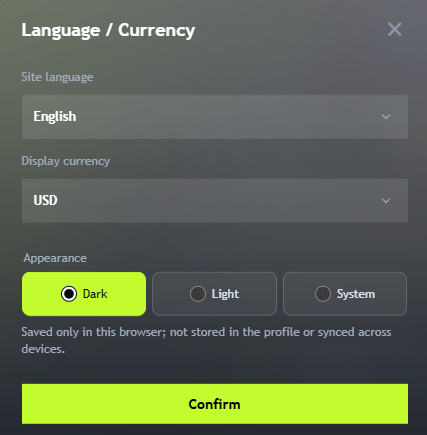
Language and currency settings

YoveYa

A digital entertainment platform for players worldwide. Prices, orders and service status come from the server.

Bahasa Indonesia · ไทย
GoogleLINEMicrosoftTikTok

Store

Top UpMembershipNews

Support

HelpOrder lookupAbout usContact us

Policies

Privacy policyTerms of service

Payment methods

Account balance

© 2026 yoveya. All rights reserved.

Choose how cookies are used

We use cookies for checkout, sign-in and security, and record site visits and referral sources. Visits can be linked to your account after sign-in. Google Analytics is enabled only when you accept all. View cookie policy